Modernization and Power of Automation for Database Administration Essential Best Practices
Abstract
As a Database
Administrator, it’s very complex to Maintain huge Servers and Databases without
downtime for Critical Applications. Modernization of database administration
through automation has become a critical factor for enhancing High
Availability, efficiency, reliability and scalability. The role of automation
in reducing manual tasks, minimizing errors and improving the performance of
database operations. Key areas such as automated backups, performance
monitoring, security management and disaster recovery without data loss. Here
are the insights on how organizations utilize modern automation techniques
adoption and leverage automated database administration to stay competitive in
an increasingly data-driven world.
Keywords: Data, ansible, automation, errors, CICD, access, Consistency, Backups, Jenkins.
1. Introduction
In today’s World there
is rapid growth in Customer Data and it requires lots of regular database
administration work to be done to stabilize and secure databases. So,
implementing regular work can be automated to reduce human errors. By
leveraging automation organizations can not only reduce operational costs but
also enhance the scalability and responsiveness of their data infrastructures.
However, successful implementation of automated systems requires adherence to
best practices to maximize the benefits while avoiding common pitfalls.
The landscape of database administration has evolved significantly in recent years, driven by technological advancements and the increasing complexity of modern applications. To meet the demands of today's data-intensive environments, database administrators (DBAs) must embrace modernization and automation. By leveraging automation tools and techniques, DBAs can streamline their tasks, improve efficiency, reduce errors and enhance overall database performance.
This article explores the essential best practices for modernizing database administration and harnessing the power of automation. We will discuss key areas such as database infrastructure modernization, automation of routine tasks, implementation of continuous integration and continuous delivery (CI/CD) pipelines and the adoption of cloud-native database platforms. Through these strategies, DBAs can position themselves for success in the evolving world of database management and deliver optimal value to their organizations.
2. Importance
and structure
Many of the
administrative tasks required to keep databases operating efficiently need to
be performed regularly. While in some respects, these activities can become
routine and mandate for the administrative team, they are nevertheless vital
for the organization and the health of its databases. In some cases, a database
administrator (DBA) spends the majority of their day on endeavors that are
time-consuming and repetitive.
Database automation is the practice of employing processes and tools to lighten the burden on enterprise DBAs. Standardized and well-documented procedures lend themselves to being automated, as do many of the daily activities that run behind the scenes to keep these critical systems performing as expected. There are multiple benefits to database automation that impact individual administrators as well as the entire organization.
2.1. Increased DBA productivity: One of the immediately apparent benefits of automation is the increased level of productivity enjoyed by the database team. Without having to concern themselves with some of their more repetitive duties, they can turn their attention to increasing performance and tuning SQL queries. A DBA can also support more systems when a subset of their responsibilities has been automated, further increasing the team’s productivity metrics. DBAs can spend time reviewing the results of automated processes on multiple machines instead of manually performing the tasks for substantial gains in productivity.
2.2. Process stability and consistency: Automating processes implies that they are repeatedly executed in the same way. This automation introduces a level of consistency that is not possible with manually run procedures. Observing the automated processes over time can result in discovering improvements that can be replicated throughout the environment. Optimizing the procedures becomes even more important when they are used regularly. Part of the productivity gains that result from automation can be spent on streamlining and further improving the processes. Database automation should be seen as a continually evolving endeavor to perform administrative tasks optimally.
2.3. Error reduction: Human error is responsible for the vast majority of issues affecting IT environments. The multiple platforms and systems the average DBA needs to keep tabs on present numerous opportunities for simple oversights or mistakes. Automating processes removes the possibility of omissions like forgetting to kick off the backup jobs, leaving critical databases unprotected. Eliminating human errors is a significant reason for organizations to adopt database automation. Each automated process removes another instance of potential mistakes made by the DBA team.
2.4. Creating new job opportunities: In larger organizations, there are often teams designated to implement and oversee the database automation efforts. These roles are perfectly suited to DBAs who have a deep understanding of the processes being automated. Their knowledge can be used to the advantage of the whole database environment rather than the subset of systems for which they were responsible. Becoming more involved in data analytics and visualization is also an attractive route for DBAs who have successfully automated many of their daily processes.
2.5. Enabling more value-added activities: Freeing up a database team from repetitive administrative work allows them to get involved with more value-added activities. They can focus on new database platforms and implementations that previously were unable to be addressed due to time constraints. DBAs can delve into the fine points of the platforms they support when unencumbered by mundane daily activities. This focus can result in discovering new performance optimizations that address user concerns and make the systems more valuable to the organization.
3. Research
and Methodology
There are some use
cases that we can use to automate database administration tasks. Many aspects
of database administration are prime candidates for automation. Some of them
are tasks that need to be performed daily. However, even procedures that are
sparingly used can be automated to ensure they are executed perfectly when the
need arises.
Some of the tools available nowadays to implement in all organizations like
èAWS System Manager: It’s a tool or service
from AWS that is used to Patch servers without Manul work it all used to create
patch groups with required patches that need to be pushed to servers. It
can be used in multiple ways also for Change Management, Node Management like
Compliance, session manager, Patch Manager, etc
èJenkin CICD: is
a very useful tool when it comes to automating Continuous Integration (CI)
and Continuous Delivery (CD) processes, It will help to deploy code in All
environments like dev, test and prod. Jenkins allows developers to
automate repetitive tasks, streamline workflows and ensure that code changes
are efficiently tested and deployed across various environments.
èDatabase
backups: NetApp, Commvault and Rubrik solutions will
take database backups regularly with encryption to safeguard customer data.
èDatabase
Performance: Idera, SolarWinds,
Datadog and multiple solutions in the market to keep database monitoring
and send Notifications to Database administrators to take action if any issues
with Databases and Servers 24/7.
èCode-Based
Automation: Python, PowerShell and
CMD to automate most of the takes for Infrastructure and Databases.
èAnsible: Ansible only needs to
be installed on the machines that you use to manage your infrastructure.
It does not need a
client to be installed on the managed machine, nor does it need any server
infrastructure to be set up before you can use it and its open source too.
èChef: Chef
is a configuration management technology developed by Opscode to manage
infrastructure on physical or virtual machines. It is an open source developed
using Ruby, which helps in managing complex infrastructure.
èCloud
formation: Infrastructure as code that is used to create AWS
resources like RDS, S3, etc
èPuppet: Similar to Ansible and
Chef, Puppet automates the management of database infrastructure, ensuring
consistency and reliability across environments.
èLiquibase: An open-source
database schema change management tool that automates database version control,
making it easier to track and apply changes across environments
èFlyway: A
database migration tool that automates the process of applying
version-controlled changes to your database schema. It supports multiple
databases and integrates well with CI/CD pipelines.
èAWS Database Migration Service (DMS): Its Tool
where us can migrate databases from the On-Prime Datacenter to the Cloud
and it will help you to migrate heterogeneous Databases.
èTerraform Implementation for Automation: It is very
useful to provide any resource in All Cloud environments like AWS, AZURE, OCI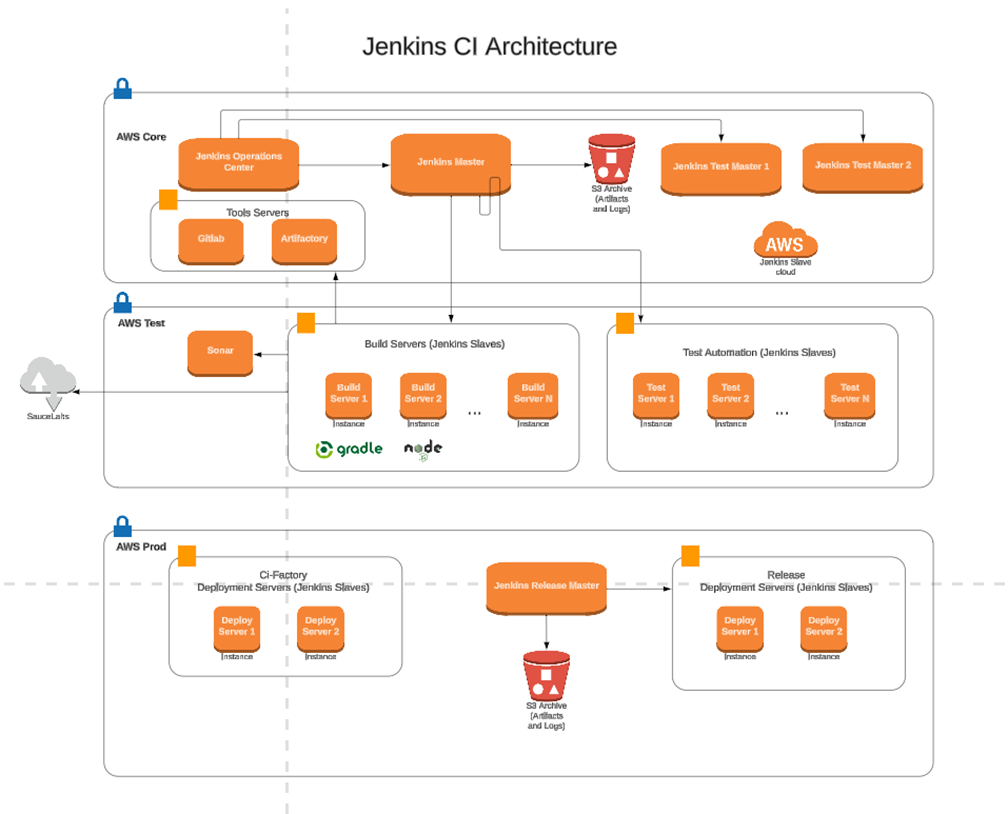
Diagram: Example Jankin Automation CICD
3.1. Database Health Checks: Health checks are necessary to provide insight into possible performance and capacity issues. Most DBAs are well aware of the issues that can impact their databases. However, checking many informational metrics manually is an error-prone task that can be lost in the shuffle of a busy IT environment. Automated health checks combined with robust reporting ensure databases are running smoothly. They can also provide information that can be used to address proactively changes in usage patterns before they become problems that impact users.
3.2. Access Management: Automated processes can be useful in many areas of access management. In busy IT environments, database user IDs are continually being created and deleted as business needs change. Creating the logins and their underlying file structures and permissions can easily be automated, removing another tedious task from the DBA team.
Observing user behavior is another area where automated processes and monitoring are beneficial. Changes in how elevated permissions are being exercised can be an indication of unauthorized activities related to enterprise data resources. Automatically generated warnings and alerts give organizations a better chance of keeping their systems secure.
3.3. Compliance Checks and Audits: Complying with data privacy and security standards has assumed a crucial role in the IT landscape. Databases can hold sensitive and personal information that needs to have access restricted to authorized personnel to remain compliant with regulations. Keeping tabs on who is accessing data cannot be accomplished effectively with manual processes.
Automated compliance checks can be instrumental in keeping the database environment compliant with privacy regulations. The reports generated from these tools can also supply evidence to demonstrate compliance to auditors. The increased focus on keeping private data resources secure demands all the methods at an organization’s disposal and automation is a perfect fit.
3.4. Provisioning: The process of provisioning new database instances for testing and development involves many related procedures that all need to come together flawlessly. Many enterprises create new instances regularly to address changing business conditions, making provisioning a logical place for automation. Missing a step in the provisioning process can set the team back and cost an inordinate amount of time correcting the mistake. Automating the process enables teams to quickly and efficiently set up new instances. That is even possible in situations where a DBA is not available to take the controls manually and ensure consistent results.
Automating the provisioning process also introduces a level of standardization that provides benefits when the systems need to be patched and upgraded. Working from a uniform provisioning palette facilitates all subsequent patching and upgrades and makes it easier to use automation for those functions as well.
3.5. Patch and Upgrade Management: An outgrowth of provisioning automation is the ability to perform automated patch and upgrade management. The standards enforced when developing automated provisioning procedures make it possible to streamline system upgrades and patches. In the absence of standardization, it is impossible to automate full patching procedures due to differences in system implementation. Modifying the scripts necessary to perform the upgrades would quickly become unwieldy when dealing with non-standardized system provisioning.
3.6. Testing: Procedures that are used to test new database instances or configuration changes can be automated and reused repeatedly. This reuse is a case where refining the automated testing processes over time will lead to more resilient systems as better tests are developed. Sets of tests can be created to address different scenarios and kept ready to be unleashed at a moment’s notice. They can be used in conjunction with provisioning and patch management processes to automate the rollout of new systems and upgrading of the database environment. Reports generated from automated testing verify that all steps were completed successfully.
3.7. Performance Tuning: Some aspects of performance tuning can be automated with the right tools. Automatically making extra disk space available or switching to a less-utilized network segment to provide additional bandwidth can go a long way toward keeping systems running smoothly. Human intervention can complement automated tuning processes and is required to set the parameters that trigger environmental changes.
4. Challenges
and limitations
4.1.
Complexity of Integration: Integrating
new automation tools with existing systems can be complex and time-consuming.
Legacy systems may not be compatible with modern automation technologies,
requiring significant effort to bridge the gap.
4.2. Data Security and Privacy: Automation can introduce new vulnerabilities if not properly managed. Ensuring data security and compliance with privacy regulations is a critical challenge, especially as data breaches become more sophisticated.
4.3. Skill Gaps: The shift to automated database administration requires new skill sets. Existing database administrators (DBAs) may need extensive training to effectively use automation tools, which can be a significant investment in time and resources.
4.4. Resistance to Change: Organizational resistance to change can hinder the adoption of automation. Employees may be reluctant to embrace new technologies due to fear of job displacement or unfamiliarity with new processes.
Limited Flexibility:
Automated systems can
sometimes lack the flexibility to handle unique or unexpected scenarios that
require human judgment. This limitation necessitates a hybrid approach,
combining automation with human oversight.
4.5. Dependence on Vendors: Relying on third-party automation tools can create dependency on vendors for updates, support and customization. This can limit an organization’s ability to quickly adapt to new requirements or issues.
4.6. Scalability Issues: While automation aims to improve scalability, poorly implemented solutions can lead to scalability issues, particularly if the underlying infrastructure is not robust enough to handle increased loads.
4.7. Maintenance and Updates: Automated systems require regular maintenance and updates to remain effective. This ongoing requirement can be resource-intensive and may introduce new challenges if not managed properly.
4.8. Initial Setup Time: The initial setup and configuration of automated systems can be time-consuming. This can delay the realization of benefits and may require significant upfront planning and resources.
5. Best
Practice
it is essential to
learning and knowledge sharing. Detailed documentation, regular training
sessions and collaborative platforms can help teams stay updated with the
latest tools and best practices. By these strategies organizations can achieve
a more agile, resilient and efficient database management system, ultimately
driving better business outcomes. Keep trying to Automate routine tasks,
monitor all required databases with essential settings while provisioning and keep
up to date with compliance and security practices when we implement automation
to rotate certificate and SSL, TDE and TLS configurations. Adopt AI
integration techniques for automation Always.
6. Not
Everything can or should be Automated
There are some tasks
and opportunities for decision-making that do not make good targets for
automation. They demand intellectual talents that only humans can currently
bring to the table. Activities such as making business decisions based on the
value of data resources should remain something done by informed and
responsible members of the organization.
Even some processes that can be automated should be left alone for reasons that may not be so obvious. Fully automating SQL code generation can dull the coding skills of the DBA team, making it harder for them to address problems effectively outside of the automated tool’s capabilities. Teams need to remain sharp and able to engage when intuitive thinking and action are required to handle unexpected and unique situations.
7. Future
planning and Guidance
Implementing AI tools
and Machine Learning will help in future analysis
·Google Cloud
AutoML Tables: Helps automate database
management tasks using machine learning models to optimize queries, identify
performance issues and streamline database operations.
·Microsoft
Azure AI for Databases: Integrates
AI-driven insights for automated query optimization, database tuning and
predictive maintenance.
·Oracle
Autonomous Database: Uses machine
learning algorithms to automate patching, tuning, backups and scaling with
minimal human intervention.
8. Cost
saving for Org
Implementing automation
can be expensive, involving costs for new software, hardware and training.
Small and medium-sized enterprises (SMEs) might find it challenging to justify
these investments but if we use open-source tools and take advantage of
Scripting will save lots of COST for Organizations. Most of the companies are
automating via code like PowerShell and Python to save time and automation
improvements.
9. Conclusion
As a Database, we
used to manage multiple Flavors like SQL server oracle, MySQL, Postgres and Redshift
with Dynamo DB with RTO and RPO and we took advantage of automation is crucial
for efficient and effective database administration. By adopting cloud-based
services, service-oriented architectures and multi-tenant designs organizations
can significantly enhance their database performance and scalability.
Automation tools and practices, such as Infrastructure as Code (IaC), Terraform
Implementation, automated testing and DevOps CICD integration, repeat tasks,
reduce Manul errors and ensure consistency for critical environments.
10. References
1. IBM: Best Practices for Cloud Computing Adoption
2.Microsoft: Automatically Indexing Millions of Databases in Microsoft Azure
SQL
3.Oracle: Ensuring a Fast, Reliable and Secure Database Through
Automation
4.Ansible: Ansible on AWS: End-To-End Automation for Systems and Workflows
5.Chef: Compliance
Automation White Paper
6.Puppet: Infrastructure as Code Use Cases
7.Cloud Vendors' AI for Database Services: Each major cloud provider (AWS,
Microsoft Azure, Google Cloud) offers its AI-powered database management
solutions.
8.https://docs.oracle.com/en/database/autonomous-database-cloud-services.html
9.https://docs.aws.amazon.com/.
10.https://www.jenkins.io/doc/.
11.https://docs.liquibase.com/.
12.https://documentation.red-gate.com/fd/welcome-to-flyway-184127914.html