Preventing Security Code Vulnerabilities in the Age of AI (Artificial Intelligence) Code Assistants
Abstract
In today's rapidly evolving technological landscape, the integration of Artificial Intelligence (AI) code assistants has revolutionized software development, promising increased efficiency and productivity. However, alongside this innovation comes the risk of inadvertently introducing security vulnerabilities into codebases. Integrated Development Environments (IDEs) equipped with code scanning capabilities play a crucial role in mitigating these risks. This whitepaper explores the significance of IDE code scans in identifying and preventing security vulnerabilities, particularly in the context of AI code assistants. It examines common vulnerabilities, highlights the challenges posed by AI-generated code, and outlines best practices for integrating code scans into the development workflow to bolster security measures effectively.
Keywords: AI, IDE, SAST, SCA, Code Scans, AI Assistants
1. Introduction
Multiple companies have embarked on modernizing their security platforms with vendor tools that can provide innovative security solutions using the AI capabilities.
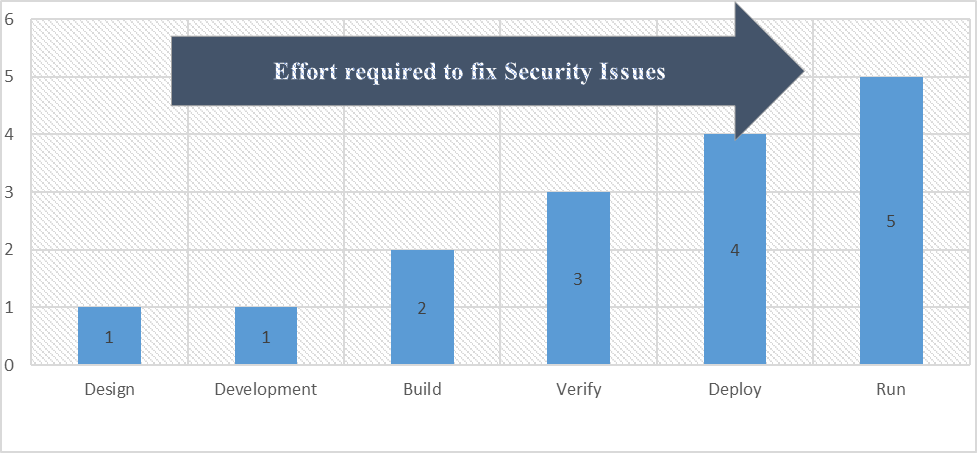
Introduction of AI into security platform offers several advantages, including comprehensive vulnerability detection, intelligent remediation recommendations, continuous monitoring and alerting, developer-friendly insights and guidance, scalability and flexibility, and enterprise-grade security and compliance capabilities. Leveraging the new capabilities significantly reduces the effort required to remediate the vulnerabilities. According to NIST (National Institute of Standards and Technologies), organizations could potentially save 5 times effort in security vulnerability remediation.
2. Developer-First Security
Clean code begins in Developers IDE. Developer-first security gives a coder a “developer-friendly” security tool that lives in the IDE and empowers developers to find and fix security issues in a painless manner. Ideally these security controls are automated, allowing a busy developer not to have to think about security requirements to build secure code — the process just happens naturally as part of the coding process. Below are the standard and custom tools provided to developers to secure code in the integrated development environments.
A. Gen AI assisted IDE Security Plugins
Using IDE-based security plugins helps developers find and fix code quality issues and security risks as quickly as they are added to their projects. Moreover, this helps developers ship fewer security risks and to improve the security risk posture of the software they ship over time. Plug-ins can alert developers if their code or a third-party library or package contains a potential security flaw.
a) Snyk is a developer security platform. Snyk provides actionable fix advice in your tools. Snyk offers IDE security plugins for JetBrains, Visual Studio Code, Eclipse, and Visual Studio. With automated and guided fixes in-line with code, Snyk provides the context and knowledge to apply a fix while keeping you in your IDE. No distractions or downtime.
The New Left in Secure Development Lifecycle

a) JFrog Xray has an IDE plugin which enables developers to flag and fix vulnerabilities as early as the development phase in a software development lifecycle.
b) Sonarlint, SonarQube’s IDE plugin, highlights bugs and security vulnerabilities as you write code, with clear remediation guidance so you can fix them before the code is even committed.
B. Need for IDE Scans
As AI code assistants become increasingly prevalent in software development, ensuring the security of code has never been more critical. The seamless integration of AI tools into Integrated Development Environments (IDEs) offers developers unprecedented opportunities for efficiency and innovation. However, this integration also introduces new challenges, particularly concerning the inadvertent introduction of security vulnerabilities into codebases. IDE code scans emerge as a vital mechanism for mitigating these risks, providing developers with essential insights into potential vulnerabilities and enabling proactive remediation efforts.
C. Understanding IDE Code Scans
IDE code scans serve as a proactive security measure, allowing developers to identify and address potential vulnerabilities during the development process. By analyzing code for common security issues such as injection attacks, authentication flaws, and cryptographic weaknesses, IDEs equipped with code scanning capabilities empower developers to uphold security standards and best practices effectively. In the age of AI code assistants, these scans play an even more critical role in safeguarding codebases against the risks associated with AI-generated code.
D. Challenges Posed by AI Code Assistants
While AI code assistants offer significant benefits in terms of productivity and code generation, they also introduce unique challenges concerning security. AI-generated code may inadvertently contain vulnerabilities such as hardcoded credentials, insufficient input validation, or insecure cryptographic implementations. Moreover, the dynamic nature of AI models presents difficulties in validating the reliability and security of generated code. As such, developers must remain vigilant in identifying and addressing potential security risks introduced by AI code assistants.
E. Benefits of IDE Code Scans in the Age of AI
Incorporating IDE code scans into the development workflow provides numerous benefits, particularly in the age of AI code assistants:
a) Early Detection of Vulnerabilities IDE code scans enable developers to identify security vulnerabilities early in the development process, minimizing the risk of deploying insecure code.
b) Integration with AI-Assisted Development By seamlessly integrating with AI code assistants, IDE code scans complement AI-generated code by providing essential security insights and validation.
c) Empowerment of Developers IDE code scans empower developers to take proactive measures in addressing security vulnerabilities, fostering a culture of security awareness and responsibility within development teams.
d) Enhancement of Code Quality By highlighting potential security issues, IDE code scans contribute to the overall improvement of code quality, ensuring that software applications adhere to robust security standards.
F. Best Practices for Integrating IDE Code Scans
To maximize the effectiveness of IDE code scans in the age of AI code assistants, developers should adhere to best practices such as:
a) Regular Code Scanning Incorporate regular code scanning sessions into the development process to proactively identify and address security vulnerabilities.
b) Manual Review of AI-Generated Code Conduct manual reviews of code generated by AI assistants to identify and mitigate potential security risks introduced by AI-generated code.
c) Customization of Scan Rules Customize code scanning rules to align with the specific security requirements and standards of the project, focusing on vulnerabilities relevant to AI-generated code.
d) Continuous Education and Training Provide developers with ongoing education and training on secure coding practices, AI model validation, and the significance of security vulnerabilities identified by code scans.
e) Collaboration and Communication Foster collaboration and communication within development teams to ensure that security considerations are integrated seamlessly into the development process, particularly when leveraging AI code assistants.
G. Conclusion
In conclusion, IDE code scans play a crucial role in preventing security vulnerabilities in the age of AI code assistants. By leveraging the capabilities of IDEs equipped with code scanning functionalities, developers can identify, mitigate, and prevent potential security risks associated with AI-generated code. Through a combination of proactive measures, continuous education, and best practices integration, developers can uphold robust security standards and safeguard codebases against emerging.
3. AI Assistant Introduced Code Vulnerabulities
Let us consider a scenario where a development team is building a web application that includes a form for user registration. To expedite development, they decided to utilize an AI code assistant to generate the form validation logic automatically.

Figure1: v3. The AI code assistant generates the following validation logic for the user registration form.
At first glance, the generated code provides basic validation for the username, email, and password fields. However, upon closer inspection, it becomes evident that the validation logic is incomplete and susceptible to security vulnerabilities.
A. Security Vulnerability: Inadequate Input Sanitization
The generated validation logic fails to adequately sanitize user input, leaving the application vulnerable to various injection attacks, including cross-site scripting (XSS) and SQL injection.

Figure 2: v4 Consider the following modified username input.
When passed through the validation function, the input is deemed valid as it meets the minimum character length requirement. However, when rendered in the application's HTML, the unescaped script tags execute malicious JavaScript code, leading to a potential XSS attack.
B. Impact
a) XSS Attack Malicious actors can exploit the inadequate input sanitization to inject and execute arbitrary JavaScript code within the application, compromising user privacy and security.
b) SQL Injection Inadequate input validation also exposes the application to SQL injection attacks, allowing attackers to manipulate database queries and potentially access or modify sensitive data.
C. Prevention
To mitigate the security vulnerabilities introduced by AI-generated validation logic, developers must:
a) Manually Review Generated Code Conduct thorough manual reviews of code generated by AI assistants to identify and address security vulnerabilities, such as inadequate input sanitization.
b) Implement Comprehensive Input Validation Enhance the generated validation logic to include comprehensive input sanitization measures, such as escaping special characters and validating input against a whitelist of allowed values.
c) Educate Developers on Security Best Practices Provide developers with training on secure coding practices, emphasizing the importance of robust input validation and the risks associated with inadequate sanitization.
d) Integrate Automated Security Checks Utilize automated security testing tools and IDE code scans to identify and mitigate security vulnerabilities throughout the development lifecycle.
4. Integration with IDE Code Scans
Incorporating manual review processes and automated security checks, such as IDE code scans, can help detect and prevent security vulnerabilities introduced by AI-generated code. IDEs equipped with Static Application Security Testing (SAST) and Software Composition Analysis (SCA) capabilities can identify common security flaws, including inadequate input validation and injection vulnerabilities. By integrating these consolidated code scanning capabilities into the development workflow, developers can ensure the robustness and security of their applications, even in the age of AI code assistants.
Mandating the usage of IDE code scans involves establishing policies, providing resources, and fostering a culture of security within the development team. Here is a step-by-step approach to mandate the usage of IDE code scans effectively:
A. Policy Development
a) Draft a clear and comprehensive policy outlining the requirement for IDE code scans in the development process.
b) Define the frequency of code scans (e.g., before each commit, during code review, etc.).
c) Specify the types of scans to be performed, such as Static Application Security Testing (SAST), Software Composition Analysis (SCA), and Dependency Scanning.
d) Set expectations for addressing and resolving identified vulnerabilities.
B. Education and Training
a) Provide training sessions to familiarize developers with the importance of IDE code scans and how to effectively utilize scanning tools within their IDE.
b) Offer guidance on interpreting scan results and prioritizing vulnerabilities based on severity.
c) Emphasize the role of code scans in maintaining a secure codebase and reducing the risk of security breaches.
C. Integration into Development Workflow
a) Integrate IDE code scans seamlessly into the development workflow to minimize disruption and encourage adoption.
b) Configure IDEs to automatically trigger code scans during specific events, such as file save or before each commit.
c) Ensure compatibility and integration with version control systems to track scan results and vulnerabilities over time.
D. Enforcement and Accountability
a. Implement mechanisms to enforce compliance with the code scanning policy, such as code review checklists or automated checks in the CI/CD pipeline.
b. Hold developers accountable for adhering to the policy and addressing identified vulnerabilities promptly.
c. Provide feedback and support to developers who may encounter challenges or require assistance with code scanning tools.
Monitoring and Reporting
a) Establish monitoring mechanisms to track the usage of IDE code scans and ensure consistent adherence to the policy.
b) Generate regular reports on code scanning activities, including scan results, vulnerabilities identified, and actions taken to remediate them.
c) Use metrics to evaluate the effectiveness of code scanning efforts and identify areas for improvement.
Continuous Improvement
a) Encourage feedback from developers regarding the usability and effectiveness of IDE code scanning tools.
b) Continuously evaluate and update the code scanning policy and procedures based on evolving security requirements and industry best practices.
c) Foster a culture of continuous improvement, where developers are empowered to suggest enhancements to the code scanning process and tools.
By following these steps and actively promoting the importance of IDE code scans, organizations can effectively mandate their usage as a fundamental component of their software development lifecycle, contributing to the overall security and integrity of their applications.
Demonstrating productivity gains with IDE security code scans involves highlighting the time and resource savings, improved code quality, and reduced security-related incidents resulting from their implementation. Here are several ways to highlight productivity gains effectively:
A. Time Savings
a) Quantify the time saved by developers through the automation of security code scanning within their IDEs. Compare the time required for manual code reviews and ad-hoc security checks before the adoption of IDE code scans.
b) Highlight the reduction in time spent on identifying and fixing security vulnerabilities during the development process. Highlight how IDE code scans enable early detection and resolution of issues, minimizing the need for extensive debugging and rework later in the development lifecycle.
B. Resource Optimization
a) Display how IDE code scans optimize resource allocation by integrating security testing seamlessly into the development workflow. Illustrate how this approach reduces the reliance on separate security teams or external security tools, streamlining the development process.
b) Highlight the efficiency gains achieved by consolidating multiple security testing capabilities, such as Static Application Security Testing (SAST), Software Composition Analysis (SCA), and Dependency Scanning, within the IDE environment.
C. Code Quality Improvement
a) Demonstrate the correlation between the adoption of IDE code scans and improvements in code quality metrics, such as code coverage, code complexity, and adherence to coding standards.
b) Highlight how IDE code scans contribute to the reduction of technical debt by identifying and addressing security vulnerabilities early in the development lifecycle. Emphasize the long-term benefits of maintaining a clean and secure codebase.
D. Security Incident Reduction
a) Quantify the reduction in security-related incidents, such as data breaches, security breaches, and compliance violations, resulting from the proactive identification and mitigation of vulnerabilities through IDE code scans.
b) Highlight specific case studies or examples where IDE code scans have prevented potential security incidents by identifying and addressing critical vulnerabilities before they could be exploited.
E. Developer Feedback and Satisfaction
a) Collect feedback from developers regarding their experience with IDE code scans, focusing on aspects such as usability, effectiveness, and integration into their development workflow.
b) Highlight positive testimonials or endorsements from developers who have experienced productivity gains and efficiency improvements from utilizing IDE code scans.
F. Comparative Analysis
a) Conduct a comparative analysis between projects or teams that utilize IDE code scans and those that do not, highlighting the differences in productivity, code quality, and security posture.
b) Use quantitative metrics, such as lines of code scanned per developer or vulnerabilities identified per project, to illustrate the impact of IDE code scans on productivity and security outcomes.
By leveraging these approaches, organizations can effectively demonstrate the productivity gains associated with the adoption of IDE security code scans, reinforcing the value proposition, and driving broader adoption across development teams.
5. Approach and Solution
It is easier said than done and large enterprises often face challenges with adoption and maturity.
How to enforce IDE Scans for Developers?
Need to take a different approach by merging the Security Code Scanning plugins along with AI Assisted code plugs. It allowed us to quickly enable all developers to use common IDE security tools.
Start applying additional metrics like below to track the usage.
• Last Scan Time vs Last Code Commit Time
• Number of Scan types
• Number of Scans vs Number of Code Commits
• Number of AI Code Suggestions
• Tracking by Leader
Conclusion
Historically large enterprises have multiple security tools for each scan type which results in multiple plug-ins which puts unnecessary load on the developer machine. It is highly recommended to go with a Vendor which supports consolidated scan capabilities in IDE plug-ins.
Conduct multiple training courses, and Survey & User feedback sessions to track the progress.
One of the frequent questions asked is, how to measure the actual productivity gains and show the savings. It is too early to determine the actual cost savings; we will find more information as we go along. More Productivity gains can be tracked in future by leveraging the number of vulnerabilities it prevented.
6. Acknowledgment
This article was supported by Cody Taylor (Global Head of DevOps at Dell Technologies) - I thank him for his valuable inputs.
7. References
- https://snyk.io/platform/ide-plugins/
- https://www.sonarsource.com/products/sonarlint/
- https://docs.github.com/en/copilot/quickstart
- https://codeium.com/autocomplete
- https://www.researchgate.net/figure/IBM-System-Science-Institute-Relative-Cost-of-Fixing-Defects_fig1_255965523