SAVIYNT IGA Solution for Simplifying and Streamlining the IT Operations
Abstract
Saviynt Identity
Governance and Administration (IGA) ensures that users have seamless access to
necessary resources on the cloud, on-premises, or in hybrid environments.
Irrespective of whether the critical assets reside on the cloud or on-premises,
IGA enables organization to effectively bring together all user and accounts
information in a single pane using automation jobs and connections.
Keywords: Enterprise
Identity Cloud (EIC) converges IGA capabilities and provides predefined
connectors that can be configured by administrators and application owners to
integrate with external, identity-aware applications, such as REST-based
applications, Office 365, Microsoft Azure, and business-critical procurement
and sourcing applications such as SAP Ariba. These connectors support
capabilities, such as import of identity and access data (full/incremental),
account creation and status change (enable/disable), account modification
(assign or revoke entitlements, modify account attributes), account deletion
based on deprovisioning or access rejection.
As part of phase 1B
implementation, the ITPN team will focus on creating the connectors for 5
applications – Azure AD, CyberArk, M365, Azure DevOps, and Ariba. This document
describes the high-level architecture for the 5 connector applications.
The SDD describes design
goals and considerations, provides a high-level overview of the system
architecture, and describes the data design associated with the system, as well
as the human-machine interface and operational scenarios. The high-level system
design is further decomposed into low-level detailed design specifications for
each system component, including internal communications, software, system
integrity controls, and external interfaces.
1. Introduction
Saviynt EIC provides
predefined connectors that can be configured by administrators and application
owners to integrate with external, identity-aware applications, such as
Microsoft Active Directory, Salesforce, database and REST-based applications,
Workday, Epic, Cerner, Office 365, Google Apps, Amazon AWS, Microsoft Azure,
and GitHub. Predefined connectors are also available for on-premises business
critical applications, such as SAP, Oracle EBS, and PeopleSoft.
Phase 1B is implementing
the 3 Out-of-the-box connectors (Azure AD, CyberArk, M365) and 2 custom REST
Connector (Azure DevOps, Ariba).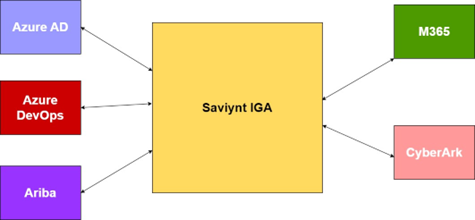
Figure 1: Context diagram.
The connectors provide
data transfer capability to and from the Saviynt IGA system and the target
system. This data transfer would be for either ingesting data into Saviynt for
the purposes of governance and certification or for provisioning and de-provisioning
users and accounts in the target system.
The detail requirements
document for each of the connector can be found at the links below.
•Azure AD
•Azure DevOps
•CyberArk PVWA
•Microsoft 365
•Ariba
The first phase of Phase
1B will only focus on importing accounts and users from the target systems.
Once the users and accounts are ingested into the Saviynt system,
certifications will be performed. Phase 1B will focus on a hybrid of
Application Owner/Manager certifications initially.
The goal of access
certification is to understand who has access to what to strengthen least
privilege access model. For that to happen, we need to pull user info,
entitlements (roles), and mapping of user-to-roles from the target systems. We
need user and related access/permission information.
The Phase 1B design is
primarily API based. Saviynt IGA would use oAuth2 compliant REST APIs with
target systems such as Azure AD, Azure DevOps, M365, CyberArk and Ariba. Each
of these target systems support Open APIs that are REST or SCIM (System for Cross-domain
Identity Management specification) compliant. Saviynt connectors would store
the configuration required for authentication/authorization and calls to get
the users, accounts, and entitlements.
Wherever possible, the
connectors will be supplemented with the scripts needed to maintain them
easily.
2. Design Considerations
•Ariba REST API availability and usage – This was mitigated
with the help of Ariba Procurement and Supplier team. The Saviynt REST
connector can be used for importing into Saviynt. However, the Master Data API
that enables this functionality does not support provisioning of users. The
provisioning of users is supported by the Identity Provisioning SAP Ariba SCIM
API that is currently in beta and available only to the SAP Task Center use
case. This is an early access API with limited availability to a small set of
customers. An alternative implementation for future provisioning use cases
would be to use the SFTP Connector from Saviynt. This connector can query
Saviynt IGA repository and upload a CSV file to target system FTP folder. The
SAP scheduled job can then pick it from that SFTP folder.
•M365 Agent architecture needs to cover the long-term
objectives. It must be maintainable. Where possible PaaS services should be
used.
•CyberArk Identity Portal Licensing and SCIM API
availability. The current installation of the CyberArk Privilege Vault Web
Application (PVWA) doesn’t expose the SCIM API. Additionally, licenses must be
purchased and SCIM Server must be configured. This is a must for the Saviynt
CyberArk SCIM Connector.
•The primary goal of this project is to ingest all user
accounts and entitlement data from target systems like Microsoft Azure AD,
Ariba, CyberArk, M365, and ADO, into Saviynt IGA.
•Additionally, once the entitlement data is in Saviynt, the
application owners will run certification campaigns to certify the access and
entitlements of individuals and groups.
•Where possible, the implementation will use Out-of-the-box
Connectors. When using REST/SCIM compliant APIs from the target host systems,
the implementation will use Saviynt REST connectors. If the implementation is
highly complex and is not covered by any of the built-in connectors the
implementation will create custom code connectors.
•All connector implementations will be documented
extensively for usage, maintainability, and extensibility.
•All connector JSON files will be stored and versioned in
the project GIT repository in Azure DevOps.
•All connector JSON files will follow the documentation and
best practices guidelines as provided by the Saviynt team.
3. Development Methods and
Contingencies
The Saviynt connector
implementation uses several OOTB connectors. Each of these connectors can be
configured to connect to target system REST endpoints. The design involved for
this is primarily identifying target system APIs, and how they can be securely
accessed from Saviynt. Each of the connectors would be hosted in a connector
microservice. Sometimes the connectors do not exactly support the required
integration between Saviynt and target systems. In these cases, custom
connectors will be developed and hosted in these microservices.

Figure 2: EIC framework.
4. Architectural
Strategies
•Use of out-of-the-box Saviynt connectors. Wherever
possible OOTB connectors are preferred to reduce development timeframes and
need to testing custom code.
•Use of Saviynt REST connectors for integrating with target
systems. Wherever needed Saviynt REST connector should be used to ingest user
data from target API systems.
•Use of oAuth2 or OpenAI compliant REST/SCIM APIs. Industry
standard authentication and swagger enabled protocols are preferrable when
consuming REST/SCIM APIs from target systems.
•Use of Java for custom connector code. Saviynt uses java
jar files for custom connector code. Therefore, we will create connectors using
the same Spring Boot libraries.
•Use of .NET Web API for Azure DevOps API connectivity.
Certain services run using delegated permissions from a service account. These
services should be encapsulated in the .NET Web API.
•Future connector development will build a gateway of APIs
used across multiple connectors. There will be a mix of custom code connectors,
REST connectors and OOTB connectors used in future application integrations.
•The implementations will use IaaS and PaaS cloud services
as needed for the connector integration.
•The implementation shall hook on to Saviynt’s internal
error handling using the available error and exception sections in the JSON
provided for the internal OOTB connectors. When implementing custom connectors,
the developer should follow the same error and exception handling patterns.
•The system shall scale up and scale out as needed for
handling connector traffic from different target systems.
•The current state IAM architecture has Saviynt IGA
application servers hosted in the AWS cloud with a peering connection between
the cloud network and on-premises network. The on-premises Saviynt client
interacts with the database and active directory servers.
•The future state of the IAM architecture for the
downstream systems will onboard the numerous applications like Microsoft 365
SharePoint, and Teams applications, Ariba Procurement and Sourcing
applications, CyberArk Password Vault application, Dynamics 365 etc.

Figure 3: Actual diagram.
5. Goals and Guidelines
The primary goal of this
project is to ingest all user accounts and entitlement data from target systems
like Microsoft Azure AD, Ariba, CyberArk, M365, and ADO, into Saviynt IGA.
Additionally, once the
entitlement data is in Saviynt, the application owners will run certification
campaigns to certify the access and entitlements of individuals and groups.
Where possible, the
implementation will use Out-of-the-box Connectors. When using REST/SCIM
compliant APIs from the target host systems, the implementation will use
Saviynt REST connectors. If the implementation is highly complex and is not
covered by any of the built-in connectors the implementation will create custom
code connectors.
All connector
implementations will be documented extensively for usage, maintainability, and
extensibility.
All connector JSON files
will be stored and versioned in the project GIT repository in Azure DevOps.
All connector JSON files
will follow the documentation and best practices guidelines as provided by the
Saviynt team.
All connectors will follow
the mapping requirements as stated in the business requirements documents.
As most of the connector
data transfer activity happens behind the scenes during a schedule import job
execution, it is important to test the connector configurations and the import
jobs for reliability, responsiveness, and durability. The configuration should
not result in hung jobs and should fail promptly after a period of execution as
mentioned in the timeout period parameter.
The connectors are hosted
in a microservices container, and these containers are hosted at the edge
either in a single tenant or multitenant model. Saviynt services are hosted in
a single-tenant edge model. As the number of connectors increases the edge services
like container scaling parameters, elastic and RDS databases, MQ topic
partitioning should be adjusted to optimize the performance of the Saviynt IGA
system. A ticket should be opened with the Saviynt helpdesk to resolve
performance related issues.
Performance requirements
are the defined scalability or responsiveness expectations of specific
workloads that are processed on a system.

Figure 4: SAVIANT cloud
architecture.
6. System Architecture and
Architecture Design
Saviynt EIC provides
predefined connectors that can be configured by administrators and application
owners to integrate with external, identity-aware applications, such as
Microsoft Active Directory, Salesforce, database and REST-based applications,
Workday, Epic, Cerner, Office 365, Google Apps, Amazon AWS, Microsoft Azure,
and GitHub. Predefined connectors are also available for on-premises business
critical applications, such as SAP, Oracle EBS, and PeopleSoft.
Standard connectors
support capabilities, such as import of identity and access data
(full/incremental), password synchronization, account creation and status
change (enable/disable), account modification (assign or revoke entitlements,
modify account attributes), account deletion based on deprovisioning or access
rejection, password management, and management of AD/LDAP groups.
The above diagram depicts
the Saviynt connector architecture for Azure AD, CyberArk, Azure DevOps, Ariba,
and M365.
At the onset, an azure app
registration with proper application permissions to graph and office 365 APIs
is provisioned. Azure acts as the Identity provider for Office 365, Azure AD,
CyberArk, and Azure DevOps Saviynt connectors. Ariba Connector uses SAP Ariba’s
own Identity provider.

Figure 5: Future state
architecture.
The following interfaces
are used for the connectors below.
1)Azure AD – oAuth2 REST using the Graph APIs
2)Azure DevOps – oAuth2 REST using the VSTS APIs
3)CyberArk – oAuth2 SCIM API
4)M365 – oAuth2 REST using Graph and Office 365 APIs
Ariba – oAuth2 using the
Ariba OpenAI.

Figure 6: Connector
architecture.
The general connector
architecture is a pattern taken from the API gateway book. Each connector has a
security system which acts as an application wrapper for the target system API
connection. The application wrapper is called an endpoint. It provides an
interface to configure the authentication, authorization, and search API calls
to the target application.
A Security System
represents the connection between EIC and the target application.
A Connected Application is
the target application for which EIC manages the identity repository.
An Endpoint is an instance
of an application within the context of a security system. A Connector is a
software component that enables communication between EIC and Azure through the
Azure Management API.
Import Job is a background
scheduled job using crontab to import or provision data from the Azure AD
system.
7. Azure AD and DEVOPS
Connector Architecture


Figure 7: Azure IDP
authentication.
EIC for Azure AD delivers
comprehensive security management, governance, and intelligence for Azure AD
accounts by continuously scanning objects, such as users, roles, groups, and
applications, for any risky misconfiguration or unauthorized user access.
The above architecture
diagram illustrates Saviynt’s Azure Connector architecture and communication
with Azure AD. The right-side depicts the Azure and left side depicts the EIC.
Azure AD Connector is used for reconciliation of all the users and accounts.
Azure Management API is used for integration between EIC and Azure AD. Saviynt
uses the Azure IDP to authenticate and authorize users based on the permissions
granted to the tenant associated with the Saviynt connector registration. Once
the AuthN/AuthZ routine is completed the subsequent calls to the graph API are
performed using the access/refresh token procured from the authentication
calls.
Azure AD connectors are
triggered by import jobs. Azure AD import jobs perform the following:
On the first day: Saviynt
import job performs a full import of objects (accounts, access, or users) to
bring in all existing records from the Azure application to EIC. As part of
this process, the records that are deleted in the target system are also identified
and marked as inactive. Microsoft Graph API is used to keep track of users and
groups imported from Azure AD to EIC. After it does a full import of users and
groups, it stores a delta token in EIC.
On the nth day: After the
first full import, an incremental import job for bringing in only the changes
that are made in the target application after the last full import, is run.
From the next run onwards, only the Azure AD objects that have been added,
modified, or deleted after the first import operation are fetched for
importing.
During incremental import,
Microsoft Graph API uses the delta token to check and verify the users that are
newly imported after the first full import. It skips already imported users and
groups, and only imports the newly added users or groups after the full import
to EIC. The incremental import performs an import of updated users and groups
and newly added/removed users and groups to EIC. The incremental import job is
run daily.
8. References
1. https://savantwealth.com/our-process/
2. https://www.saviantconsulting.com/blog/bi-maturity-model.aspx