The Impact of Salesforce Lightning Web Components (LWC) on UI/UX Design and Development
Abstract
The evolution of Salesforce's front-end development frameworks reflects a broader shift towards modern web standards and enhanced user experiences. Initially, Salesforce Classic relied heavily on server-side rendering, which, while functional, limited the interactivity and responsiveness of user interfaces. The introduction of Aura Components was a significant advancement, enabling more dynamic, client-side interactions. However, Aura's proprietary nature and performance constraints highlighted the need for a more streamlined and standards-compliant approach1.
In response, Salesforce introduced Lightning Web Components (LWC), a framework built on core Web Components standards such as Custom Elements, Shadow DOM and HTML Templates2. LWC leverages modern JavaScript (ES6+) to deliver lightweight, efficient and reusable components that align with contemporary web development practices. This transition not only enhances performance and scalability but also simplifies the development process by reducing the learning curve for developers familiar with standard web technologies3.
This whitepaper examines the impact of LWC on UI/UX design and front-end development within the Salesforce ecosystem. It explores how LWC improves performance through optimized rendering, supports scalable application architectures and facilitates accessibility compliance (Figure 1). Additionally, the paper outlines best practices for building robust LWC applications and provides a step-by-step guide to developing LWC components4.

Figure 1: Evolution of Salesforce’s Front-End Development Frameworks.
1. Introduction
Salesforce's journey in front-end development has undergone significant transformations, transitioning from Visualforce to Aura Components and most recently to Lightning Web Components. Each phase reflects a commitment to enhancing user experience (UX) and aligning with contemporary web development standards5.
Visualforce, introduced in 2008, marked Salesforce's initial foray into customizable user interfaces. It used a tag-based markup language, akin to HTML, enabling developers to create custom pages tightly integrated with Apex, Salesforce's proprietary programming language. While functional, Visualforce's reliance on server-side rendering limited its ability to deliver dynamic, interactive user experiences.
To address these limitations, Salesforce unveiled Aura Components in 2014. This framework introduced a client-side architecture, allowing for the development of reusable, modular components that could communicate with each other and the backend. Aura leveraged JavaScript on the client side and Apex on the server side, facilitating more responsive and flexible UIs compared to Visualforce. However, Aura's proprietary nature and performance constraints highlighted the need for a more streamlined and standards-compliant approach.
Recognizing the advancements in web standards, Salesforce introduced Lightning Web Components in 2019. LWC is built on modern web standards, including ECMAScript 6+, Custom Elements, Shadow DOM and HTML Templates. By taking advantage of these standards, LWC offers a lightweight, efficient and reusable component model that aligns with contemporary web development practices. This shift not only enhances performance and scalability but also simplifies the development process by reducing the learning curve for developers familiar with standard web technologies.
The broader industry trend toward standards-based front-end development has been driven by the need for interoperability, maintainability and performance optimization. Frameworks that adhere to web standards enable developers to create applications that are more consistent across different platforms and devices. Salesforce's adoption of LWC reflects this shift, providing developers with tools that are both powerful and aligned with the evolving web ecosystem6.
The importance of UI/UX in enterprise applications cannot be overstated. Users expect intuitive, responsive and accessible interfaces that facilitate seamless interactions. By embracing LWC organizations can meet these expectations, delivering applications that are not only functionally robust but also provide superior user experiences.
2. Lightning Web Components
Lightning Web Components is Salesforce's modern framework for building user interfaces, leveraging core Web Components standards and modern JavaScript to deliver efficient, scalable and maintainable applications. Introduced to address the limitations of the Aura framework, LWC aligns closely with contemporary web development practices, offering a more streamlined and performant approach to component-based development7.
2.1. Core concepts of lightning web components
2.1.1. Templates (HTML): LWC utilizes HTML templates to define the structure of components. These templates are declarative, allowing developers to bind data and handle events directly within the markup, promoting clarity and separation of concerns.
2.1.2. JavaScript controllers: Each LWC component is backed by a JavaScript class that encapsulates its behavior. This class handles logic, data manipulation and event handling, leveraging modern JavaScript features such as ES6 modules, classes and decorators like @api, @track and @wire for property and method exposure, reactivity and data binding.
2.1.3. Reactive data binding: LWC implements a reactive programming model where changes in component properties automatically reflect in the UI. This reactivity simplifies state management and ensures that the user interface remains consistent with the underlying data model.
2.1.4. Base lightning components: Salesforce provides a library of pre-built base components that adhere to the Lightning Design System. These components, such as lightning-button and lightning-input, offer standardized functionality and styling, accelerating development and ensuring consistency across applications8.
2.1.5. Lifecycle hooks: LWC components have a well-defined lifecycle with hooks like constructor(), connectedCallback(), renderedCallback() and disconnectedCallback(). These hooks allow developers to execute code at specific stages of a component's existence, facilitating tasks such as initialization, DOM manipulation and cleanup (Figure 2).

Figure 2: Foundational Knowledge for Developing with LWC.
2.2. Advantages over aura components
2.2.1. Performance: LWC components are more lightweight and efficient compared to Aura components. By using native browser APIs and minimizing framework overhead, LWC delivers faster load times and improved runtime performance.
2.2.2. Standards compliance: Built on web standards like Custom Elements, Shadow DOM and ES6, LWC promotes better compatibility with modern web development tools and practices. This adherence to standards facilitates easier integration with other technologies and reduces the learning curve for developers familiar with standard web development.
2.2.3. Enhanced developer experience: LWC's modular architecture and use of standard JavaScript enhance code maintainability and reusability. Developers benefit from improved tooling support, including better debugging capabilities and integration with modern development environments9.
Lightning Web Components represent a significant advancement in Salesforce's UI development paradigm, offering a modern, efficient and developer-friendly framework that aligns with the broader web development ecosystem.
3. Impact on UI/UX Design
Salesforce's Lightning Web Components framework has significantly enhanced user interface and user experience design within the Salesforce ecosystem. By using modern web standards and optimized rendering techniques, LWC facilitates the development of responsive, accessible and visually consistent applications.
3.1. Enhanced performance and responsiveness
LWC operates on the client side, allowing for faster rendering and improved responsiveness. Components are created and destroyed as needed within a single-page application context, reducing server round-trips and enhancing user interactions. This approach aligns with best practices for performance optimization in web applications.
3.2. Rich, interactive single-page applications
The framework's architecture supports the creation of dynamic, single-page applications that provide seamless user experiences. By utilizing standard web APIs and modern JavaScript features, developers can build interactive interfaces that respond promptly to user actions, enhancing overall engagement.
3.3. Streamlined mobile responsiveness
LWC components are designed with mobile responsiveness in mind. The use of the Salesforce Lightning Design System grid utility enables developers to implement fluid, mobile-first layouts. Components such as lightning-layout and lightning-layout-item facilitate the creation of responsive designs that adapt to various screen sizes and devices.
3.4. Customizable styling with SLDS and CSS custom properties
Styling in LWC is streamlined through the integration of SLDS and the use of CSS custom properties. Developers can apply SLDS utility classes to ensure consistency with Salesforce's design language. Additionally, CSS custom properties or styling hooks, allow for the customization of component appearances without altering the underlying SLDS styles10.
3.4.1. Accessibility improvements: LWC emphasizes accessibility, incorporating features that support users with disabilities:
Native focus management: Components handle focus appropriately, ensuring that keyboard navigation and screen readers function effectively.
ARIA attributes support: Developers can utilize ARIA attributes to convey semantic information to assistive technologies, enhancing the accessibility of custom components.Compliance with WCAG standards: Salesforce is committed to adhering to the Web Content Accessibility Guidelines (WCAG) 2.1 Level AA, ensuring that applications built with LWC meet recognized accessibility standards.
4. Performance Optimizations Enabled by LWC
Lightning Web Components significantly enhance application performance within the Salesforce ecosystem by leveraging modern web standards and optimized rendering techniques. This section explores the key performance optimizations enabled by LWC, including client-side rendering, Shadow DOM benefits, lazy loading, modular JavaScript architecture and performance measurement best practices (Figure 3).

Figure 3: Performance Optimizations with Lightning Web Components (LWC).
4.1. Client-side rendering enhancements
LWC operates predominantly on the client side, allowing components to be created and destroyed dynamically within a single-page application context. This approach reduces server round-trips, leading to faster load times and a more responsive user experience. By handling rendering on the client, LWC minimizes latency and improves overall application performance.
4.2. Shadow DOM benefits: Encapsulation and reduced CSS bloat
The implementation of Shadow DOM in LWC provides encapsulation for component styles and DOM structures. This encapsulation ensures that styles defined within a component do not leak out and are not affected by external styles, leading to more predictable and maintainable code. Additionally, Shadow DOM reduces CSS bloat by isolating styles, preventing unnecessary overrides and conflicts11.
4.3. Lazy loading of components and data
LWC supports lazy loading techniques, allowing components and data to be loaded on-demand rather than at initial page load. This approach improves performance by reducing the initial payload and loading resources only when necessary. For example, implementing infinite scrolling in data tables enables the application to fetch and render additional records as the user scrolls, enhancing efficiency and user experience12.
4.4. Modular javascript architecture and payload reduction
LWC promotes a modular JavaScript architecture, encouraging developers to build components with a single responsibility. This modularity facilitates code reuse, easier maintenance and reduced JavaScript payload sizes. By loading only the necessary modules, applications can minimize resource consumption and improve load times.
4.5. Performance measurement and benchmarking best practices
To ensure optimal performance, Salesforce provides tools and best practices for measuring and benchmarking LWC applications. Developers are encouraged to use browser developer tools to monitor rendering performance and identify bottlenecks. Additionally, adhering to coding best practices, such as minimizing DOM manipulations and optimizing data bindings, contributes to enhanced application efficiency13.
5. Scalability and Maintainability of Applications with LWC
Salesforce's Lightning Web Components framework is designed to support the development of scalable and maintainable applications. By using modern web standards and a modular architecture, LWC allows for the creation of complex applications that are both efficient and adaptable to evolving business needs.
5.1. Building large-scale applications with reusable components
LWC promotes the development of reusable components through its modular design. Developers can create components that encapsulate specific functionalities, which can then be reused across different parts of an application. This approach not only reduces code duplication but also simplifies maintenance and enhances consistency throughout the application. Utilizing slots in LWC further enhances component flexibility, allowing for dynamic content insertion and greater reusability14.
5.2. Component composition and separation of concerns
The framework encourages a clear separation of concerns by allowing developers to compose complex interfaces from smaller, self-contained components. Each component manages its own state and logic, leading to a more organized codebase. This compositional approach simplifies debugging and testing, as each component can be developed and evaluated independently.
5.3. Standardized component lifecycle for predictability
LWC components follow a standardized lifecycle, including hooks such as constructor(), connectedCallback() and disconnectedCallback(). These lifecycle methods provide predictable entry points for initializing components, handling updates and performing cleanup tasks. This predictability enhances code reliability and simplifies the integration of components within larger applications.
5.4. Managing state across complex applications
In applications with numerous interacting components, effective state management is crucial. LWC offers mechanisms like the Lightning Message Service to facilitate communication between components, even if they are not in the same DOM hierarchy. LMS enables components to publish and subscribe to messages over a shared channel, promoting decoupled and scalable communication patterns.
5.5. Deployment at scale: Benefits of salesforce's metadata-driven model
Salesforce's metadata-driven architecture allows for efficient deployment and management of applications. Developers can define components, configurations and customizations as metadata, which can be version-controlled and deployed across different environments. This approach streamlines the deployment process and ensures consistency across development, testing and production environments.
5.6. Versioning and updates: Simplifying change management
LWC supports component-level API versioning, enabling developers to specify the API version for each component. This feature ensures that components remain stable and behave consistently, even as the underlying platform evolves. By isolating components from changes in newer API versions, developers can manage updates more effectively and reduce the risk of introducing regressions.
6. Accessibility by Design: How LWC Drives Inclusive Applications
Salesforce's Lightning Web Components framework is designed with accessibility at its core, enabling developers to create inclusive applications that cater to users with diverse abilities. By adhering to modern web standards and incorporating built-in accessibility features, LWC simplifies compliance with the Web Content Accessibility Guidelines (WCAG) 2.1 Level AA.
6.1. Accessibility features built into LWC
Semantic HTML Enforced by Templates: LWC encourages the use of semantic HTML elements within its templates, ensuring that the structure and meaning of web content are conveyed accurately to assistive technologies. This practice enhances the interpretability of web applications for users relying on screen readers and other assistive tools.
Keyboard navigation support: Components developed with LWC are inherently designed to be navigable via keyboard inputs. This feature is crucial for users who cannot utilize pointing devices, allowing them to interact with applications effectively. Developers are advised to test components for keyboard accessibility, ensuring logical focus order and operability of interactive elements15.
Error handling and user feedback mechanisms: LWC provides mechanisms for delivering real-time feedback to users, such as form validation messages and status updates. These features are essential for informing users of errors or changes in state, thereby improving the overall user experience and accessibility of applications.
6.2. Best practices for accessibility in LWC
Utilizing Lightning Base Components: Salesforce offers a suite of pre-built Lightning Base Components that are accessibility-certified and adhere to SLDS guidelines. Employing these components ensures consistency in design and behavior, while also reducing the burden on developers to implement accessibility features manually.
Creating custom accessible components: When custom components are necessary, developers should incorporate appropriate ARIA roles and properties to convey the purpose and state of UI elements to assistive technologies. For instance, assigning role="button" to a clickable element informs screen readers of its functionality.
Simplifying conformance to WCAG 2.1 standards: LWC's alignment with web standards and its built-in accessibility features facilitate adherence to WCAG 2.1 guidelines. By leveraging semantic HTML, ensuring keyboard operability and providing meaningful feedback, developers can create applications that meet accessibility requirements more efficiently.
7. Best Practices for Building Scalable and High-Quality LWC Applications
Salesforce's Lightning Web Components framework provides a robust foundation for developing scalable, maintainable and high-quality applications. By adhering to established design principles, code practices, performance optimizations and user experience considerations, developers can leverage LWC to build efficient and user-friendly applications (Figure 4).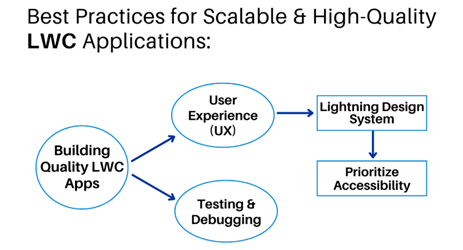
Figure 4: Best Practices for Scalable & High-Quality LWC Applications.
7.1. Design principles
Component modularity and focus: LWC encourages the development of small, focused components that adhere to the Single Responsibility Principle. This approach enhances code readability, simplifies testing and promotes reusability across applications. By encapsulating specific functionalities within individual components, developers can manage complexity effectively.
7.2. Code practices
Efficient data access with lightning data service: Utilizing LDS allows components to perform create, read, update and delete (CRUD) operations without the need for Apex code. LDS handles sharing rules and field-level security automatically, ensuring data consistency and reducing the likelihood of errors. Moreover, it improves performance by caching data on the client side, minimizing server round-trips.
Avoid direct DOM manipulation: Directly manipulating the Document Object Model (DOM) can lead to unpredictable behavior and maintenance challenges. LWC provides reactive properties and templating mechanisms that automatically update the UI in response to data changes. Developers should rely on these features to manage the DOM, ensuring consistency and reducing the risk of errors.
Implement lazy loading: To enhance performance, components and data should be loaded only when necessary. Implementing lazy loading techniques, such as using the if: true directive, ensures that non-essential components are rendered only upon user interaction, reducing initial load times and improving responsiveness.
7.3. Performance practices
Optimize event handling: Efficient event handling is crucial for responsive applications. Developers should utilize standard event propagation mechanisms and avoid unnecessary custom events. Properly managing event listeners and handlers ensures that components communicate effectively without introducing performance bottlenecks.
Minimize server round-trips: Reducing the number of server calls enhances application performance. By leveraging client-side caching mechanisms, such as LDS and cacheable Apex methods, developers can decrease latency and improve the user experience.
7.4. UX practices
Prioritize meaningful interactions: User interactions should be intuitive and purposeful. Avoid excessive animations or transitions that do not contribute to the user's understanding or task completion. Focus on delivering clear, concise and responsive interactions that align with user expectations.
Ensure consistent visual feedback: Providing immediate and consistent feedback for user actions enhances usability. Utilize standard UI patterns and components to maintain consistency across different devices and screen sizes. This approach ensures that users receive appropriate cues and confirmations, improving overall satisfaction.
8. The Development Process: Building an LWC Component from Start to Finish
Salesforce's Lightning Web Components framework offers a modern, standards-based approach to building user interfaces. This section outlines the comprehensive process of developing an LWC component, from setting up the development environment to deploying and testing the component.
8.1. Setting up the development environment
To begin developing with LWC, set up the Salesforce DX environment:
Install visual studio code (VS Code): Download and install VS Code, a lightweight and powerful code editor.
Install salesforce extensions for VS code: These extensions provide tools for working with Salesforce DX projects, Apex and LWC.
Install salesforce CLI: The CLI facilitates interaction with Salesforce orgs and streamlines development tasks.
8.2. Creating an LWC component
An LWC component comprises four primary files:
HTML template (.html): Defines the component's structure and layout.
JavaScript controller (.js): Contains the component's logic and event handling.
CSS stylesheet (.css): Optional; styles the component using scoped CSS.
Meta configuration (.xml): Specifies metadata, including API version and component visibility.
8.3. Steps to create the component
Open VS Code and access the Command Palette (Ctrl+Shift+P or Cmd+Shift+P).
Run SFDX: Create Lightning Web Component.
Provide a name for the component and select the desired directory.
8.4. Deploying to a salesforce org
To deploy the component:
Authorize your salesforce org using SFDX: Authorize an Org.
Deploy the component with SFDX: Deploy Source to Org.
Add the component to a Lightning App Builder page or an Experience Cloud site as needed.
8.5. Testing components
8.5.1. Unit testing with Jest: Jest is the recommended framework for unit testing LWC components.
Setup: Install Jest using the Salesforce CLI: sf force lightning lwc test setup
Writing tests: Create test files with the.test.js extension, placing them in the __tests__ directory.
Running tests: Execute tests using: npm run test:unit
Integration testing: For integration testing, consider using tools like WebdriverIO or Selenium, as the Lightning Testing Service is deprecated.
8.6. Debugging and troubleshooting
Effective debugging practices include:
Using browser developer tools: Inspect elements, monitor console logs and debug JavaScript.
Leveraging VS code debugger: Set breakpoints and step through code to identify issues.
Utilizing salesforce CLI logs: Analyze logs for errors and performance metrics.
Employing jest debugging: Run tests in debug mode to troubleshoot unit tests.
9. Final Thoughts
Salesforce's Lightning Web Components framework is poised to play a pivotal role in the evolution of enterprise application development, aligning with the company's strategic initiatives such as Hyperforce and industry-specific cloud solutions.
9.1. Strategic role of LWC in salesforce's future
Hyper force, Salesforce's next-generation infrastructure architecture, leverages public cloud platforms to deliver enhanced scalability, security and compliance across global markets. LWC's modular and standards-based design complements Hyper force by enabling developers to build responsive and efficient user interfaces that can seamlessly adapt to diverse regulatory and performance requirements16.
In parallel, Salesforce's industry-specific cloud offerings, such as Health Cloud and Financial Services Cloud, benefit from LWC's flexibility. Developers can tailor components to meet unique industry needs, facilitating the creation of customized solutions that adhere to sector-specific regulations and workflows.
9.2. Expansion beyond salesforce: Open-source ecosystem adoption
Salesforce's decision to open-source the LWC framework has extended its applicability beyond the Salesforce ecosystem. Developers can now utilize LWC to build web components that adhere to modern web standards, promoting interoperability and fostering innovation across various platforms17.
This open-source approach encourages community contributions, accelerates development cycles and broadens the talent pool capable of working with LWC. Organizations can leverage this expanded ecosystem to integrate LWC into diverse technological stacks, enhancing the versatility and longevity of their applications.
9.3. Future-proofing UI/UX with LWC
As Salesforce integrates advanced technologies like artificial intelligence into its platform, LWC serves as a foundational layer for delivering intelligent and personalized user experiences. For instance, integrating generative AI capabilities within LWC components can enable real-time personalization, enhancing user engagement and satisfaction.
Furthermore, LWC's alignment with web standards ensures that applications remain compatible with evolving web technologies, safeguarding investments against obsolescence. This compatibility is important for organizations aiming to maintain a competitive edge in today’s digital world.
9.4. Strategic recommendations
To capitalize on the strategic advantages offered by LWC organizations should consider the following actions:
Invest in LWC expertise: Develop internal capabilities or partner with experienced developers to harness the full potential of LWC in building scalable and maintainable applications.
Leverage open-source resources: Engage with the LWC open-source community to stay abreast of best practices, contribute to ongoing development and integrate community-driven enhancements.
Integrate AI capabilities: Explore opportunities to embed AI functionalities within LWC components to deliver intelligent and adaptive user experiences.
By embracing LWC as a core component of their development strategy organizations can enhance their agility, foster innovation and ensure their applications are well-positioned to meet future technological advancements.
10. References
- https://salesforceten.com/2025/01/17/lightning-web-components-lwc-aura-components-and-visualforce-pages-wth/
- https://www.apexhours.com/lightning-web-components/
- https://learn.anuhyadigital.com/aura-vs-lightning-web-components/
- https://cyntexa.com/blog/aura-components-vs-lightning-web-components/
- https://ejaet.com/PDF/9-1/EJAET-9-1-62-66.pdf
- https://developer.salesforce.com/blogs/2018/12/introducing-lightning-web-components
- https://training.iteducationcentre.com/lightning-web-components-vs-aura-in-salesforce
- https://developer.salesforce.com/docs/platform/lwc/guide/base-components-patterns.html
- https://techpatio.com/2025/guest-posts/difference-between-lightning-components-and-lightning-web-components
- https://salesforce.stackexchange.com/questions/374647/how-to-set-consistent-styling-across-many-lwcs-using-styling-hooks
- https://dev.to/ayaninsights/understanding-shadow-dom-in-lwc-salesforce-1jbj
- https://salesforceverse.com/how-to-implement-lazy-loading-in-lightning-web-component-lwc/
- https://jeet-singh.com/post/best-practices-for-optimizing-lwc-performance/
- https://sfdclesson.com/2023/11/29/create-flexible-and-reusable-components-with-lwc-slots/
- https://twistellar.com/blog/salesforce-accessibility-overview
- https://salesforcetrail.com/the-future-of-salesforce-top-trends-for-2025
- https://www.crsinfosolutions.com/chapter-1-lwc-tutorial-lwc-oss